# Developing a UI with Vue, Part 1: Introducing the Project
React was the first front-end frameworks I got to know. That was a year and a half ago, and I've really enjoyed learning and growing with it. Sure... there are still some things I still don't fully understand, but I'm complicated too! Who am I to judge? 🤷♂️
However, last year I was brought onto a project using **jQuery** where I was writing a lot of CSS, and it had me wondering whether I liked writing CSS in React at all. That's when I began looking into other frameworks, and developed a crush on Vue.
## Why I was crushing on Vue 💚
As a UI Developer I write a lot of CSS, and none of React's solutions were appealing to me. I tried them all: CSS-in-JS, modules, styled-components...all of them had things about them that I didn't quite like (**Note**: I've since come around to [theming with styled-components](https://styled-components.com/docs/advanced) , and it's now my preferred method in React 👍).
But there were other reasons too:
- **I felt that I had hit a wall in React.** I began struggling to learn some advanced topics and, frankly, I was trying to move too fast in both the front- and back-end.
- **Vue wasn't backed by Big Tech.** I don't *love* the power that Big Tech wields, so I admired the fact that Vue is one of the independent frameworks (I see you too, Svelte).
- **I was excited to learn a new framework from square one.** The "shiny new object" phenomenon is real! It's easy to get attracted to new tech, and I liked the idea of starting fresh with a new framework.
So with all of this bubbling up, I checked out the notorious [Vue documentation](https://vuejs.org/v2/guide/). As many have said before me, they are incredibly easy to follow; that's part of the reason I got so hooked on this ecosystem. Plus...
I love how **single-file components** compartmentalize the JavaScript and allow you to write CSS right inside the file. The **v-directives** make building components a blast. **Vuex** was immediately much simpler to wrap my head around than Redux, and between [podcasts](https://devchat.tv/podcasts/views-on-vue/) and [great courses online](https://www.vuemastery.com/) to [catch-all repos like this](https://github.com/vuejs/awesome-vue), Vue has a great **community** behind it.
## So let's build a side project 🎉
I figured when I started this blog that I'd be writing about UI-related topics, not building a side project. But since I use React at work and I've been itching for a reason to get back to Vue, I thought it'd be fun to **document my experience** building with the framework for the first time. So here we are!
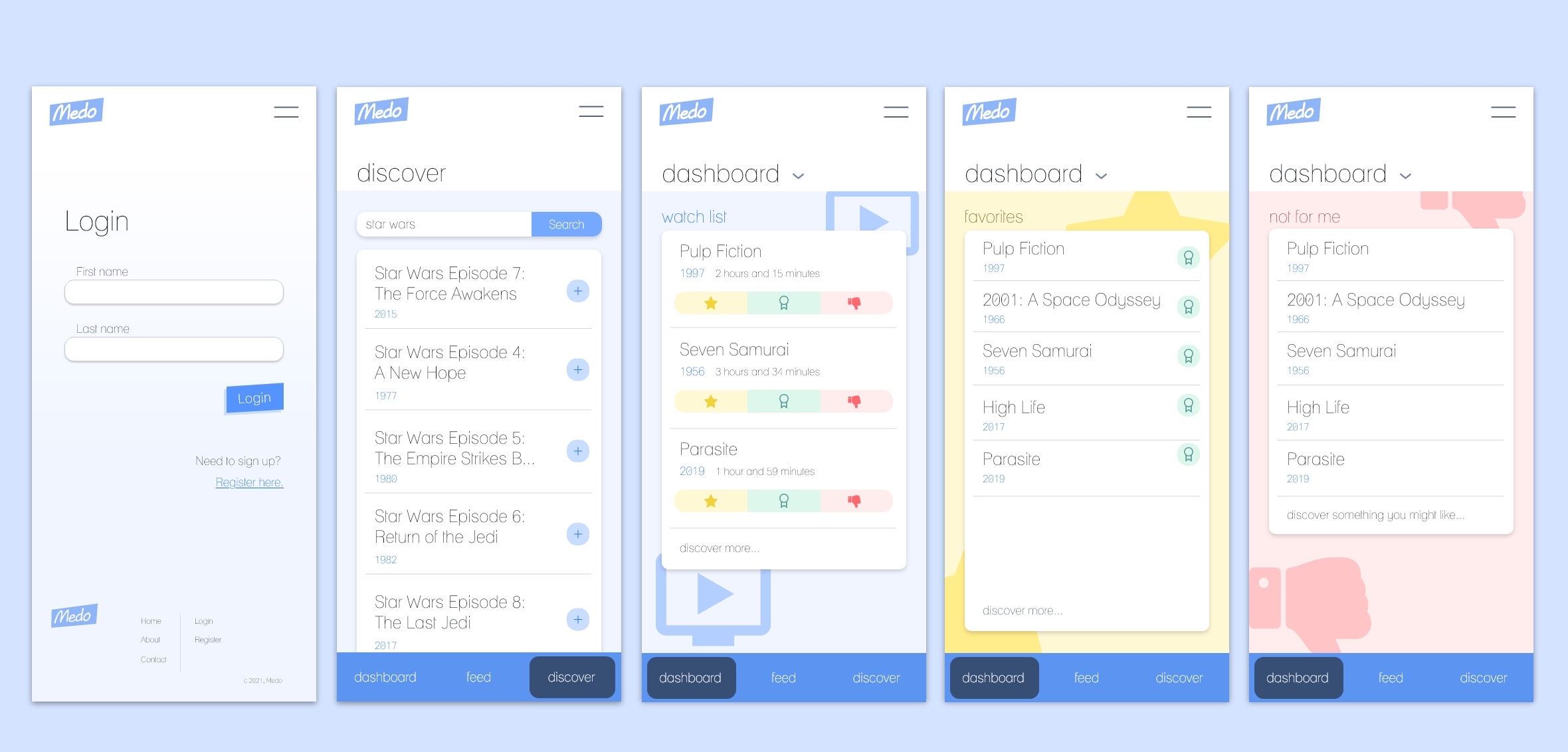
Since I love movies, I'm going to build a movie watch list app called **Medo** (I've never been good at names... 😞) and we'll be working off of the Adobe XD mock-ups pictured above. Some of our MVP requirements for the app will allow users will be able to:
- **Login to their account using mock authorization.** Later on, I'll get to using Firebase.
- **Query movies from a movie database API.**
- **Manage the movies in their watch list.** This includes organizing them into categories like favorites.
In the future, I'd love to make Medo a more social experience so that users can find friends, see what *they've* been watching, and make recommendations. But this is a start! So, let's wrap up this portion by setting up the project.
## Project setup ⚒️
First things first, we'll need to get the Vue CLI installed. The CLI will help us get the app up and running quickly with things like **SCSS**, **Vue Router**, and **Vuex**.
If this is your first time, I would head over to [the official documentation](https://cli.vuejs.org/guide/installation.html) and follow the setup guide there. As long as you're familiar with Node and NPM, installation basically boils down to either `npm install -g @vue/cli` or `yarn global add @vue/cli`.
**Update (6/29/2021)**: I was so excited to publish this that I forgot to tell you a crucial piece...after you install the CLI you'll want to create the app! To make sure the install was successful, quickly run `vue --version` and be sure that it spits out a version. Then simply running `vue create [name-of-app]` will set off the configuration process.
From there, I like choosing to manually set the configuration to use Vue 3, Babel, Router, Vuex, CSS Pre-processors, and the Linter / Formatter.
Then, we'll strip down the app so that only two simple views remain. It's important to note that only the template tags are required in `.vue` files, so the script tags are not necessarily doing anything (yet).
The **Login** view component:
```
Login
```
And the **Register** view component:
```
Register
```
We'll also create a couple of SCSS partial files in `assets/css`, where we're going to be storing variables and mixins. However, our Vue components won't be able to access those partials until we get them configured in a `vue.config.js` file at the root of our project. The lines we'll need for that can be found below. For more information config settings, I'd recommend - you guessed it - [checking out the documentation](https://cli.vuejs.org/config/#vue-config-js).
```
module.exports = {
css: {
loaderOptions: {
sass: {
prependData: `
@import "@/assets/css/_variables.scss";
@import "@/assets/css/_mixins.scss";
`,
},
},
},
}
```
If you want to include formatting with **Prettier**, you can add `"plugin:prettier/recommended"` to the `extends` array inside the `eslintConfig` portion of our `package.json`:
```
"eslintConfig": {
"extends": [
// ...existing options
"plugin:prettier/recommended"
],
// ...rest of the config settings
```
And create a `prettier.config.js` file to the root of the directory, where you can set all of your formatting options for consistency in your codebase:
```
module.exports = {
tabWidth: 2,
semi: false,
singleQuote: true,
}
```
Now that the the basic setup done, we can move onto the fun part: **building components** 🥳. In my next post, I'll begin doing that by building out the Login page. Meanwhile, [check out my last post](https://blog.mattpignatore.dev/my-journey-learning-to-code-from-books-and-bootcamp-to-ui-development) where you can get to know me and my journey.
---
### You can find me on [Twitter ](https://twitter.com/matt_pigs) and [Github](https://github.com/mpaitgt) , or you can check out my portfolio [here](https://mattpignatore.dev/) . Feel free to reach out, I'd love to hear from you!